

| Sun | Mon | Tues | Wed | Thurs | Fri | Sat |
|---|---|---|---|---|---|---|
| 1 | ||||||
| 2 | 3 | 4 | 5 | 6 | 7 | 8 |
| 9 | 10 | 11 | 12 | 13 | 14 | 15 |
| 16 | 17 | 18 | 19 | 20 | 21 | 22 |
| 23 | 24 | 25 | 26 | 27 | 28 | 29 |
| 30 | 31 |
This site operates as an independent editorial operation. Advertising, sponsorships, and other non-editorial materials represent the opinions and messages of their respective origins, and not of the site operator. Part of the FM Tech advertising network.
Entire site and all contents except otherwise noted © Copyright 2001-2011 by Glenn Fleishman. Some images ©2006 Jupiterimages Corporation. All rights reserved. Please contact us for reprint rights. Linking is, of course, free and encouraged.
Powered by
Movable Type
Clearwire adds three products, including integrated mobile hotspots: The new Clear Spot 4G and 4G+ are mobile hotspots that don't require a separate USB modem, as with their predecessors. This increased cost, but also flexibility, as you could use the USB modem either with a laptop or the router.
The Spot 4G is $100 or $5/mo on lease, and connects up to eight devices over Wi-Fi. It works only in WiMax coverage areas. The 4G+ is $225 or $6/mo on lease, shares itself with up to five Wi-Fi devices, and works over Sprint's 3G EVDO and 4G WiMax networks. Both routers will ship in July.
Clearwire also improves options for Mac users with a new 3G/4G hybrid modem, the 4G+ Mobile USB Series S ($115 or $6/mo on lease), which works with Mac OS X 10.5 and 10.6, as well as Windows XP SP2, Vista, and Windows 7. It ships 1 July 2010.
4G usage is unlimited. 3G usage has the usual restrictions: 5 GB per month, overage fees above that, and no more than 300 MB per month on roaming (read: Verizon Wireless) networks.
Posted by Glenn Fleishman at 10:03 AM | Permanent Link | Categories: 4G, Hardware, WiMAX | No Comments
I don't blame the MiFi: At Apple's flagship Worldwide Developers Conference (WWDC) keynote this morning, Steve Jobs had to more or less demand that attendees disable their MiFis and similar devices, because the sheer volume of unique Wi-Fi networks was preventing the proper functioning of the iPhone 4 for demonstration purposes.
The new iPhone 4 has dual-band 802.11n, so it's beyond me why Apple didn't prepare to use a 5 GHz network channel, since the MiFi and similar devices nearly all only create a 2.4 GHz base station either by design or default.
Update! The iPhone 4 specs are posted, and it's 802.11n in 2.4 GHz only. There apparently wasn't room for a chip with two bands and the necessary antenna. (Thanks to Micheal in the comments.)
InfoWorld has the count: 527 Wi-Fi hotspots were in operation in the keynote address, most of them MiFi, and over 1,100 devices connected among those and other shared Wi-Fi networks.
A few weeks ago, Google suffered a similar embarrassment in demonstrating Android 2.2, a new release of its smartphone software, in which the audience's heavy use of the Wi-Fi network required presenters to ask (more nicely) for people to stop using the Google-provided network.
At the iPad launch in January, Apple offered its own Wi-Fi network, which worked just fine for me, and likely reduced the use of 3G cards and MiFis. [Update! Apple did have its own public Wi-Fi network at the keynote, but everyone I spoke to did not trust it (they thought it might be a spoof network) and did not use it.]
Clearly, Apple needs to make its iPhone OS (renamed iOS this morning for its next release) better able to handle a truly ridiculous RF environment.
Posted by Glenn Fleishman at 11:17 AM | Permanent Link | Categories: Hardware, Industry | 6 Comments
 Portland, Ore., was the big win for MetroFi, back in the day, the flagship network that never was: MetroFi was unable to make its gear and business model work in a way that let them move forward, and I won't rehash the process that led them to exit the working world. However, the company left behind hundreds of SkyPilot distribution and backhaul nodes, and a $30,000 bond to remove them. The city estimates the cost will be double, and the equipment has nearly no resale value.
Mike Rogoway of the Oregonian reports that the first batch of removed gear will be handed off to Personal Telco, one of the longest-running community wireless efforts in the world, which operates a variety of free service around town. The group hopes to be able to repurpose the nodes, but I'm dubious. SkyPilot's end-point nodes had two radios, one designed for 2.4 GHz 802.11g access, and the other at 5 GHz to work with its unique point-to-point system.
(SkyPilot's approach had 8 antennas in a sectorized in its backhaul units that used GPS time synchronization to make precise, very high power point-to-point connections at scheduled intervals. One backhaul node could deliver narrow extremely high-signal power zaps of wireless communication in 8 directions seemingly "at once.")
This means that the Wi-Fi nodes have to be served by SkyPilot backhaul devices, which in turn require precise orientation and placement along with back-end management software, which was typically licensed separately.
Personal Telco suggested to Rogoway that it might disassemble them for parts, but four-year-old gear that's designed for this particular a purpose probably has little of interest, even for free.
Posted by Glenn Fleishman at 10:37 AM | Permanent Link | Categories: Hardware, Metro-Scale Networks, Municipal | 3 Comments
Apple's October revision to its AirPort Extreme Base Station and Time Capsule lets these units run at up to 450 Mbps, 50 percent faster: I knew that Apple had put a 3x3 antenna array into these devices, which could be argued was intended to improve speed-over-range, a common reason to add antennas. (Read the background in my 20 October 2009 article, "Apple Slipstreams 3x3 into Wi-Fi Base Stations.")
But I had heard that Apple had built three streams in, making these devices capable of a raw 450 Mbps operation, or 50 percent faster than nearly everything else on the market. Each stream in 802.11n can carry more data than 802.11g--more than twice as much, in fact, when wide (40 MHz) channels are used. Apple makes wide channels available only in 5 GHz, which isn't unusual; 2.4 GHz is quite crowded and full of competing uses. Thus 450 Mbps is the raw rate in 5 GHz, 225 Mbps in 2.4 GHz.
How do I know this when Apple won't reply to calls and emails on the topic? I was tipped to it by several wireless industry folks who wanted to remain anonymous--nobody likes to offend Apple--but didn't have a definitive label until today.
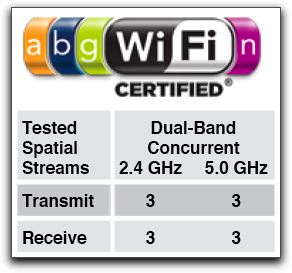 I regularly check the Wi-Fi Alliance's site for new certifications from Apple, because more information often appears there than the details Apple provides. Sure enough, based on a query from a colleague tonight, I did a search and found that on 3 December 2009, Apple's two Wi-Fi gateways had been labeled with three-stream support for transmit and receive in 2.4 GHz and 5 GHz.
[Update: The inestimable Tim Higgins of SmallNetBuilder wrote in to note that he had discovered, disassembled, and documented all this a month ago! I'm sorry to have missed it. Read his article in which he also found that Apple had connected a couple of antennas incorrectly. He confirms that it's a Marvell radio; Marvell started shipping three-stream chips nearly two years ago.]
This aggregate of 675 Mbps of raw data (something closer to 400 Mbps of TCP/IP and over 300 Mbps of net throughput) between the two simultaneously available bands is still theoretical: Apple's and most manufacturers' Wi-Fi adapters still are only sport 2x2 antenna arrays with two-stream configurations. (Apple updated its AirPort Extreme certification on 30 November to reach full 802.11n compatibility, too, but only for two streams.)
It's already been asked, but gear from before October with 2x2 arrays cannot be updated to 3x3; it's a hardware change, as is the jump from two streams to three streams.
In the short run, Apple base station buyers will get the benefit of greater range and greater speed over short ranges than with older gear. In the long run, though, there's a big speed boost to come.
Posted by Glenn Fleishman at 8:10 PM | Permanent Link | Categories: 802.11n, Hardware | 3 Comments | No TrackBacks
Apple offered a quiet update note to its two main base station models today with a big boost in speed and coverage: The company put in a note on the data page (see "Even faster performance") and mentioned in passing to media who were briefed that its AirPort Extreme and Time Capsule base stations would see a boost of up to 50 percent in data throughput and an increase in range of up to 25 percent over the immediately preceding models.
How? 3x3. Engadget found the FCC documents that supports that statement before the announcement today, although the writer didn't explain what this means.
In the MIMO (multiple in, multiple out) antenna system that's used in 802.11n, designers have lots of choices in how to build in range and resiliency, and those choices have increased as silicon and antennas have become cheaper.
Most consumer 802.11n access points use a 2x2 MIMO array, which is two receiving and two transmitting antennas. Each antenna pair is typically handled by a separate radio chain. Each radio chain can transmit unique data for higher data rates, or the same data as other radio chains to increase redundancy, and thus provide better reception at lower rates.
These radio chains use spatial multiplexing, which allows a kind of "body english" in which varying power fed through antennas steers a beam so that it travels a unique path through space, using reflection of objects as one of the characteristics that forms the beam. Multiple receiving antennas decode these individual chains and reassemble data into what was sent in the first place.
In 802.11n, each spatial stream in the highest-rate mode can act like a separate full-speed connection. Since roughly 75 Mbps is the raw rate for 20 MHz channels and 150 Mbps for "wide" 40 MHz channels, a two-stream device maxes out at 300 Mbps of raw throughput.
Nearly all 802.11n base stations sold to date use 2x2 arrays coupled with two spatial streams; some also offer 2x3 arrays for redundancy with just two streams. However, chipmakers have been planning for some time on getting 3x3 arrays with three spatial streams into the market with a raw 450 Mbps rate. Apple may be the first consumer access point maker to bite, although there are definitely other 450 Mbps APs on the market. (See next paragraph for update.)
[Update! An informed commenter--see below--notes that there's only a single AP that does three streams. So Apple isn't slipping in higher bandwidth here, just better signal diversity and performance.]
The additional transmit and receive antennas improve how far signals can travel to a client, and how sensitively an access point can pick up distant transmissions. This accounts for Apple's statement on improved range. It also provides improved bandwidth further from the base station; the data rate doesn't drop off nearly as fast as with 2x2. The "up to 50 percent" figure relates to a range of distances, not close up to the base station.
The Wi-Fi Alliance just approved a testing regime for devices with three spatial streams, and all the major Wi-Fi chipmakers were involved in that testing. Our informed commenter says it'll be until late 2010 before we see a large number of 3-stream devices; other opinions?
Posted by Glenn Fleishman at 9:28 PM | Permanent Link | Categories: 802.11n, Hardware, Home, MIMO | 6 Comments | No TrackBacks
MetaGeek breaks the $100 barrier with the Wi-Spy 2.4i: The company's new USB spectrum analyzer is a revision of its entry-level model, which handles 2.4 GHz (2.400 to 2.492 GHz). A spectrum analyzer constantly samples the radio frequency environment around you; software that works with the analyzer can derive graphs, charts, and other visual and numerical representations. You use a spectrum analyzer to troubleshoot problems in wireless network, identifying interferers, or to plan networks by figuring out what's already in place and testing access points' reach when you fire them up.
While Ubiquiti sells 2.4 GHz spectrum analyzers that are less expensive (the cheapest can be found for $40), I believe that MetaGeek is offering higher resolution (375 KHz instead of what looks like about 512 KHz). MetaGeek also has software support under both Mac OS X and Windows (with the free Chanelizer Lite).
MetaGeek also dropped the price of its next-level-up analyzer, the Wi-Spy 2.4x, which has an external antenna, and both finer and adjustable resolution. It's now just $199. The 2.4/5 GHz Wi-Spy DBx took a $200 plunge, too, and weighs in at $599.
Posted by Glenn Fleishman at 4:08 PM | Permanent Link | Categories: Hardware, Monitoring and Testing | No Comments
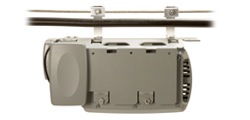
BelAir's new cable-mountable Wi-Fi/WiMax access point could be boon for WiMax deployment: BelAir has introduced the BelAir100SX Strand Mounted Dual Mode Wireless Node, a long way of saying that this device can be attached directly to existing cable wiring, powered by cable plant voltage, and drive two kinds of wireless: Wi-Fi and WiMax. (No one apparently ever told BelAir to not introduce a product with the initial SX--say it aloud--on April 1st. But it's real.)
This device is an extension of BelAir's earlier 100S, which feeds out Wi-Fi only, and which is the basis of Cablevision's $300m deployment of many many thousands of nodes across its New York, New Jersey, and Connecticut territory. Backhaul and power come from the cable plant; the device has a built-in DOCSIS 2.0 modem (U.S. and European standards), and can accept a variety of radios.
 Comcast, Time Warner Cable, and Bright House have all invested in Clearwire, the 51-percent Sprint Nextel owned venture that's rolling WiMax out across the U.S. As investors, the cable operators may be well suited to provide infrastructure for Clearwire, even though that hasn't been discussed publicly and, to my knowledge, no such deals have been made.
Comcast has already said it will resell the Clear-branded WiMax service in Portland, Ore., the only U.S. market deployed with that offering. Comcast needs Clearwire for the fourth element in a quadruple play of voice, video, data, and mobile communications (which can be voice, video, and data as well).
This all neatly dovetails.
Posted by Glenn Fleishman at 10:33 AM | Permanent Link | Categories: Broadband Wireless, Hardware, Metro-Scale Networks
Apple released simultaneous 2.4/5 GHz base station upgrades today to its two full-featured products: Apple's AirPort Extreme is in its sixth revision with the same name, by my count, and its third featuring 802.11n. The latest release moves from either 2.4 or 5 GHz 802.11n networking to supporting both bands at the same time. This is a hardware update, requiring a new unit, as Apple added a radio to the mix.
Apple also updated its Time Capsule model, an Extreme base station that comes with an internal 500 GB or 1 TB hard drive for backups and networked file sharing. Prices are the same as the previous one-band-at-a-time models: $179 for Extreme; $299 for a 500 GB Time Capsule; and a ludicrous $499 for a 1 TB Time Capsule.
Both units have four gigabit Ethernet ports, configured as 1 WAN and 3 switched LAN ports or as a 4-port switched LAN in bridged mode. Both models have a USB port that allows a printer or hard drive to be attached, or, using a USB hub, multiple devices of each kind.
Apple ships configuration software for both Mac OS X and Windows, and the system is fully compatible with Windows.
The company told me it incorporated small changes to its Mac OS X adapter hardware that allows a Mac to select the faster network if both 2.4 and 5 GHz networks are named identically. This change doesn't break Wi-Fi interoperability, but goes beyond the process that adapters use to select among available networks today. The 2.4 and 5 GHz networks may be named uniquely.
New features were added as well. Guest networking is a neat addition, using a virtual SSID and virtual LAN to create a network for guests that's got a separate encryption key and cannot see the traffic of the main network nor its Ethernet portion.
Apple also added remote secure file-sharing access to any internal or external drive on either base station model using its Back to My Mac service, which debuted in Leopard. The service requires MobileMe, a $100/year email and file-storage subscription service. Mac OS X 10.5 Leopard can initiate a strongly encrypted tunneled connection with any other Leopard system or, now, new base station that's configured with the same MobileMe account.
Those interested in deeper detail should consult my Macworld article.
Posted by Glenn Fleishman at 3:15 PM | Permanent Link | Categories: 802.11n, Hardware | 1 Comment
Meraki has decided they're a grown-up company, after all: Meraki started out as the little guy, with tiny $50 nodes that would self-organize into a mesh Wi-Fi network. Even as the company grew out of its origins, it still focused largely on indoor applications, where outdoor uses were an adjunct. Their new MR58, a 5 GHz triple-radio 802.11n ruggedized weatherproof outdoor node changes that entirely.
The $1,499 (list) unit, which meshes with all the existing gear and includes the license for Meraki's required software-as-a-service hosted management system, can go omnidirectional or directional on each of the three radios as separate systems. The company sees the unit as being a way to link locations (they claim 1 to 20 km with appropriate directional antennas), and provide front-end access in public places.
The company sells into several markets, including hotels and motels, apartment buildings, academic campuses, and hotzones. It doesn't emphasize corporate customers, although Meraki added WPA2 Enterprise authentication in a recent back-end update.
The gear Meraki is selling could be used for cities--the company has some such installations in towns--but the design is intended to extend Meraki's existing ecosystem from tiny indoor wall warts up to outdoor AC and solar-powered single-radio models.
The MR58 is 802.1af Power over Ethernet compliant, sucking down 8 watts at most, the firm's founder told me. This means a single Ethernet run to a roof can power the MR58; no AC outlets required.
You can get the full scoop in my coverage at Ars Technica.
Posted by Glenn Fleishman at 8:51 AM | Permanent Link | Categories: 802.11n, Hardware, Metro-Scale Networks
Atheros has released an open-source version of the driver software that talks directly to its chips: The company has long maintained that it required a closed HAL (hardware abstraction layer) to prevent rogue developers from changing settings in its Wi-Fi chips that would cause the chips to perform activities that were against its interest. For instance, it's a/b/g chips can use the 4.9 GHz band, which is illegal in the U.S. and many other countries, but allowed in Japan.
Those objections must have been overcome, as the firm is providing a full, ISC-licensed free software code base for their HAL for 802.11a/b/g chipsets. This should allow the ath5k project to create a fully Linux kernel integrated driver for Atheros chips with no reverse engineering or licensing issues.
This opening up of the HAL allows laptops and handhelds running versions of Linux to have more effective use of the Wi-Fi adapters built in or that can be added on. Note that Atheros hasn't opened up its 802.11n chips yet.
This HAL isn't the same as the one used by the Madwifi project, headed for several years by Sam Leffler. Leffler was able to start Madwifi up by signing an agreement with Atheros that let him write a binary HAL that could be released alongside open-source or free drivers. Leffler reiterated a few days ago on a mailing list that his HAL still wasn't available for release. And, at this point, the Madwifi project appears to be deferring to the ath5k folks. (Confusingly, information about ath5k is all noted at and accessed via links on the Madwifi site, but it's a separate project.) [news via Thomas Gee, Canard WiFi]
Posted by Glenn Fleishman at 1:16 PM | Permanent Link | Categories: Chips, Hardware
My review of the Linksys WRT610N at Macworld: The router works quite well at handling Wi-Fi and other functions, but is terrible at working with Mac OS X, one of the advertised features of the product. The WRT610N is a revised design of the previous simultaneous dual-band (2.4/5 GHz) Draft N WRT600N model which had far worse problems.
Linksys addressed many of my concerns with that previous device. The 610N can mount a drive and share it via SMB and FTP, have two full-speed connections running over both bands without skipping a beat, and supports several methods of getting the one-click WPS (Wi-Fi Protected Setup) to work. Read the review for all the details, but I can't recommend this router to Mac users with any needs beyond basic networking; I'm perfectly happy to give it a full thumbs-up for Windows XP and Vista users, however.
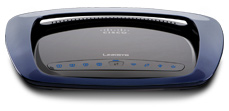
WPS is a particular mess, by the way. Linksys has four somewhat distinct methods of using WPS to enable a password-free encrypted connection between a client and a base station: a button on the front that, when pressed, turns on WPS; and three modes (one of them similar to that button) accessible via their Web configuration software. One option is to get the base station to create a short PIN that's then entered on the client system as an out-of-band confirmation that there's no man in the middle.
Apple, by contrast, has a single way of joining a WPS-offering base station: it displays the network's name in bold. Select the network, and Mac OS X displays a key code that needs to be entered on the base station. But the WRT610N can't handle that option. If you put the WRT610N into a mode in which Apple can spot the device as offering a WPS handshake, you can't enter the code into the Linksys router!
This shows that there's still rough edges in the WPS protocol that two of the highest-selling makers of Wi-Fi gear can manage to not mesh up their respective options. (Apple declined to comment for my Macworld story; Linksys confirmed the lack of compatibility, but put the burden on Apple's doorstep.)
Posted by Glenn Fleishman at 9:27 AM | Permanent Link | Categories: 802.11n, Hardware
Apple plays to my interests this morning with a set of new products and upgrades tied into wireless data: The news out of San Francisco--where I'm on site--is that Apple is rather keen on Wi-Fi. The company announced several upgrades and new products that take advantage of a lack of wires.
The iPhone location update: The iPhone can now figure out your location by triangulating either the location of nearby cell towers or by fishing around for WI-Fi signals. The cell-tower system uses information from Google, which also provides the map data. Wi-Fi location details come from Skyhook Wireless, a firm I've tracked for years. Because the iPhone can make a connection over either EDGE or Wi-Fi, Skyhook confirmed for me that the iPhone can take its snapshot of the signals around it and transmit that to their servers over either Wi-Fi or EDGE. When connected to a Wi-Fi network, the query can go over Wi-Fi, of course, but could be coupled for better results with cell radio sniffing, too. The iPod touch also gets this Maps improvement, along with a handful of other additions, as a $20 upgrade for existing users; it has to be connected to a Wi-Fi network with Internet access to provide a location, however.
Time Capsule: Apple has scored the much coveted double-win on backups here, by coupling an operating system based backup feature (Time Machine) with a network-attached storage system that requires no configuration. Time Capsule incorporates a full AirPort Extreme Base Station (with 802.11n) with an internal 500 GB or 1 TB hard drive for $299 or $499, respectively. The base station is $179 when purchased by itself. A home network could have one of these puppies and accomplish several related tasks. Backup is for Mac OS X 10.5 (Leopard) only, which is a shame, but Apple would like people to upgrade to Leopard ($129) or buy new computers, so one can't precisely blame them.
MacBook Air: The "Air" refers to the lack of connections on this starting-at-$1,799 3 lb, high-performance laptop with a 13.3-inch screen, 80 GB drive, and 2 GB RAM. The MacBook Air has very few connections: there's a USB port, along with a mini-DVI connector and headphone jack, hidden behind a latch, but there's no FireWire (IEEE 1394), no optical drive, and no Ethernet jack. A external optical drive is $99 or you can use another drive on the network (Windows or Mac) via some special software that mounts the drive without any networking hassles. It includes 802.11n and Bluetooth 2.1+EDR.
Posted by Glenn Fleishman at 2:04 PM | Permanent Link | Categories: Consumer Electronics, Hardware, Location
Meraki Networks raises $20m in additional funds, spends a small portion on providing free Wi-Fi across San Francisco: Meraki, founded by MIT students, funded by Google, Sequoia Capital, and others, will expand its current 2 sq mi mesh Wi-Fi network in San Francisco across the whole city. Meraki will foot the backhaul bill and pay for equipment--but it won't pay for real estate. The city will help publicize the network, but I haven't read anything concrete about the city's plans. (Read good local coverage in the San Francisco Chronicle.)
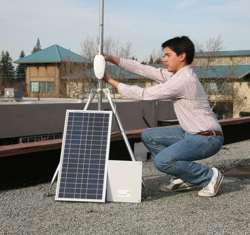
The clever bit here, and how Meraki may succeed where EarthLink failed, is that the firm is relying on individuals and businesses to choose to opt in, site equipment, and take advantage of the network working better for everyone because they participate (paging Ayn Rand). Meraki plans to offer solar-powered outdoor nodes for extending the network's reach, which means potential locations don't have to provide electricity on rooftops or elsewhere, which in turn means fewer or no layers of approval from anyone in authority (whether a neighborhood association, landlord, or the city). "It's relatively easy to install on private rooftops," said Meraki CEO and co-founder Sanjit Biswas in a briefing earlier today.
In the process, Meraki gets a city-wide testbed for local search, local ads, and new technology. "The great thing about having a real-world testbed is you can see the performance," Biswas said. Meraki is testing advertising now, but Biswas says it's "very much in the test mode."
While Biswas didn't disclose any of the costs of building the city-wide San Francisco network or its recurring bandwidth bill for backhaul--he told the AP "a few million"--the math works for Meraki. Giving away 10,000 to 15,000 nodes that cost them as little as $25 assembled for indoor nodes and a few hundred for outdoor nodes with solar chargers and batteries doesn't add up to a lot. They don't have to negotiate pole rates, handle installation, or pay recurring venue fees. Bandwidth is relatively cheap if you can choose the points at which you inject it, which Meraki will be able to do. Update: I misunderstood the backbone part. Meraki will, in fact, install some hundreds of solar-powered outdoor nodes to run the backhaul; but they'll still be working with people to find those locations rather than securing those rooftops themselves.
Meraki has learned quite a lot about the real world, Biswas said, with their current San Francisco network, having identified 20,000 interferers--other devices within range and frequency of Meraki nodes--within the 2 sq mi area. Meraki nodes use a centralized intelligence to control routing, as well as a modification to Wi-Fi that doesn't affect end users' ability to connect, but does allow clusters of routers to act dynamically as a unit.
 With unmodified mesh Wi-Fi networks, all devices within range of one another and on the same channel act in concert, reducing flexibility and throughput; smaller clusters produce better results. Further, most of the metro-scale Wi-Fi devices sold by Tropos and others are designed to put out the highest possible power output; Meraki uses generally low-power equipment. It's ants versus elephants, with ants being able to change course a bit more quickly. "It's kind of a brains over brawns approach. It's really because we have so many radios," said Biswas, that their network is more flexible. "We can set routes and load balance appropriately to get the maximum performance out of the network," Biswas said.
The current San Francisco network has seen 40,000 unique devices so far--there's no registration, so each unique adapter number is counted--and moved over 10 terabytes of data. Of those 40,000 devices, 1,000 were iPhones.
Biswas said that Meraki has discovered its biggest market may be developing countries where there's an established user base for the Internet that's limited to dial up or slow-speed broadband, and where carriers could deploy Meraki gear to get around non-existent copper infrastructure.
"A lot of our largest customers are carriers that are entering markets in Brazil and India," he said. "We're not at this point going after the most remote villages in the world; there are some very dense populations who...would love to use broadband but just can't get it."
Posted by Glenn Fleishman at 9:00 PM | Permanent Link | Categories: Free, Hardware, Mesh, Metro-Scale Networks | 3 Comments
The company decided to take some of the pain out of municipal deployments by extending its bulk price to individuals on its entry-level Wi-Fi bridge: In metro-scale networks, it's become clear that to get good indoor reception in most cases, you need a bridge. The popular bridges from Pepwave and Ruckus Wireless pick up a faint signal from a city-wide network and then essentially rebroadcast it under a different network name for users in proximity. These bridges used to start at about $150 for units with 200 milliwatt (mW) radios, which is from twice to septuple the power of built-in adapters; they usually put out 30 mW to 100 mW of juice.
The price has fallen, though, and while $100 isn't free, it's approaching a level that I suspect more people are comfortable spending to improve access in areas with coverage. Ruckus Wireless's MetroFlex DZ has a list of $149, but ExpressNets will sell it to you for $99; and Pepwave's comparable Surf AP 200 can now be bought for $129. The Surf 200, which lacks the second home network feature, is $99.
Pepwave has dropped its 400 mW Surf AP 400 from $289 to $189, which could be useful, too, in the right circumstances, but receive sensitivity is a more critical measure than transmit power in trying to "hear" distant signals. The AP 400 has a small but measurable improvement in receive sensitivity over the two 200 models. I can't find Ruckus's receive sensitivity numbers readily, but their approach involves multiple antennas, in which beam forming and multi-path reflection analysis provide their own improvements in range and reception.
Update: Ruckus provided their receive sensitivity numbers, which in nearly all cases exceed the Pepwave AP 400's numbers for nearly $100 less. Now, this requires real-world testing to see whether the multiple antennas and this higher measured sensitivity equate to a greater service area, but the raw numbers are good.
Update: Pepwave notes that in its testing transmit power is more critical; their perspective is that with metro-scale networks, the nodes can push power out quite well - often using the legal maximum - but it's difficult for them to hear distant, faint clients. An iPhone, for instance, can hear a far-distant transmitter, but can only call back weakly.
Posted by Glenn Fleishman at 5:19 PM | Permanent Link | Categories: Hardware, Home, Metro-Scale Networks
The Bluetooth SIG will create a version that runs over Wi-Fi: Bluetooth comprises applications and radio standards. The applications include standard profiles that developers use to add features like keyboard and input device access, file transfer, and dial-up networking. The Bluetooth SIG has a long-range plan to keep Bluetooth relevant by essentially adding more radio technologies underneath, not just the 1 Mbps version found in Bluetooth 1.x and the 3 Mbps version in the Enhanced Data Rate (EDR) part of 2.x+EDR.
Ultrawideband (UWB) was one of the preferred newer radio standards, something they decided on supporting in March 2006, because UWB seemed to be near term at that point, and was part of the original migration path for personal area networking in the IEEE 802.16 group that Bluetooth has some coordination with. (UWB was to be the radio standard for 802.16.3a until the group disbanded over friction caused by a now-dropped original flavor of UWB from what is now Motorola spin-off Freescale.) UWB is low-power and low-range, making it ideal.
But it's hardly on the market yet and is way too expensive. This pushes back Bluetooth over UWB in handsets to something like 2009. TechWorld notes that UWB vendors say that UWB handsets will be on the market (in Asia) within six months. Of course, UWB chipmakers and manufacturers have been telling me since 2006 that UWB products will be shipping in a few months. They weren't lying; complications ensued. I accept that. But I'm now Missouri as regards UWB in shipping hardware.
As a result, TechWorld reports, the SIG's chair, ironically a Motorola employee, said that they would focus on building Bluetooth over Wi-Fi. Details aren't available, and one UWB vendor says that Wi-Fi and Bluetooth are incompatible due to security models.
Posted by Glenn Fleishman at 4:00 PM | Permanent Link | Categories: Bluetooth, Hardware, UWB
The Linksys WRT600N sets out to offer what no router to date can (updates added 31 Oct 2007): certified Draft N networking simultaneously in the 2.4 GHz and 5 GHz bands: This is a neat feat, but requires two radios to carry out, and carries with it a hefty $280 price tag. In testing, I found a number of design choices and missing features, along with a lapse in the standards certification process, that make me suggest that users wait for firmware updates before purchasing an otherwise quite capable router.
The WRT600N's closest competitor is the Buffalo Wireless-N Nfiniti Dual Band with gigabit Ethernet released in March for $250; it's not yet Draft N certified by the Wi-Fi Alliance, hence the Linksys unit's current uniqueness. (Read SmallNetBuilder's review.) Update, 31 Oct 2007: Buffalo is currently enjoined from importing its 802.11a, b, and n gear into the U.S.
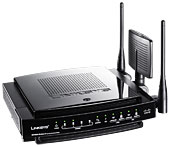 The idea of offering both bands in a single router is simplicity: You can throw away old gear while preserving backwards compatibility and not sacrificing range nor throughput. Devices that can use the 5 GHz band and that you want to have running at full throttle can do so, particularly important for video streaming. This also allows you to reduce clutter, and to migrate older equipment to newer adapters as (or if) they're available instead of all at once.
The Ultra RangePlus Dual-Band Wireless-N Gigabit Router (WRT600N)--to use its unwieldy full name--uses Linksys's EasyLink Advisor, a piece of wizard software the company has been rolling out gradually across all its models. (It can be downloaded and used with certain older devices, too.) While the EasyLink Advisor does streamline setting up a new router, troubleshooting problems, and passing out a wireless security key, it was also maddeningly slow in "discovering" the router it was trying to reach, to which it was directly connected via Ethernet on a modern, fast Dell laptop running Vista. I found it unable to configure an internal Intel Wi-Fi adapter to connect to the network, despite its assurance that it could do so.
The router also offers the usual ancient Linksys interface behind the scenes via a Web browser for advanced configuration. I found for my basic purposes, the advisor didn't offer enough, and I expect that any user who finds the need for a dual-band, simultaneous 2.4/5 GHz router will also find the advisor inadequate because of specific settings they'll want to make "by hand."
The WRT600N has four 10/100/1000 Mbps Ethernet ports. The case is a sleek black, with LEDs on the front that display the status of ports, the Internet connection, and Wi-Fi security (enabled or not). It has a single USB port to accept a hard drive or flash drive.
The WRT600N succeeded in its primary goal in life: Providing access to two separate networks while shunting data over gigabit Ethernet to directly connected devices. The 2.4 and 5 GHz networks can be set with unique names and have separate security options.
In testing for throughput, I found that the WRT600N was highly inconsistent, but that's clearly due to my particular RF environment. Although my office is a mixed retail/office/residential building, and the neighborhood isn't that dense, we have some problem on channel 1 in 2.4 GHz that renders networks in that range completely unusable, regardless of vendor. A spectrum analyzer hasn't disclosed the cause.
In 5 GHz, I see some strangeness at times, too. As a result, I can't benchmark devices with confidence when I see low or erratic numbers that don't hold up to repeated tests. Conversely, when I see consistent high performance in such a difficult environment, I can rely on the robustness of the device.
In general, I was able to see speeds across 2.4 GHz and 5 GHz that should be expected from Draft N devices, but I'm declining to note them due to my test environment. Tim Higgins of SmallNetBuilder will have extensive, controlled test results in a few days which I'll link to. Update: These benchmarks are now available in Higgins's extensive review. I see that the number I saw aren't that far off from his more controlled tests.
Now on to some specific concerns.
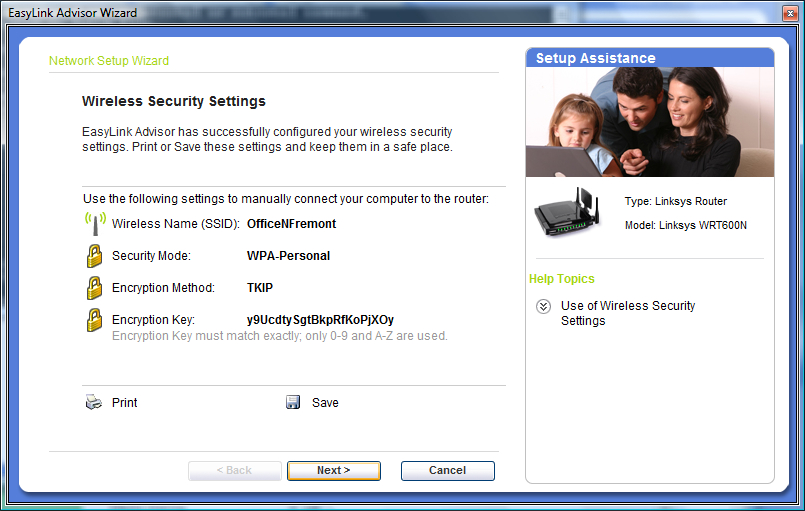 Security. If you use the EasyLink Advisor, as Linksys expects many of its users will, you cannot choose your security key; the advisor creates a strong alphabetic-only key for you. That's great, but if you don't want to use the methods available for distributing that key to other computers, you have to type in a rather long set of characters.
The advisor can create an installation program with the key embedded that can be copied by the advisor onto a USB drive or transferred over a local network by connecting an Ethernet cable to a LAN Ethernet port. I tested the USB drive method, which exported fine but failed to install on a Windows XP SP2 system without enough explanation to troubleshoot the problem. (That system had the Linksys WPC600N dual-band card installed--the $100 one-band-at-a-time counterpart to the router--and all drivers were up to date.)
I would have liked to use Wi-Fi Protected Setup (WPS), as I now have a few computers that should be able to work with it. Unfortunately, in what appears to be a late decision in the release cycle, the WRT600N lacks WPS. There's a button on the top of the router that has a plastic laminated sticker around it labeled Reserved. I confirmed with Linksys that this release lacks WPS. It's a shame.
I wound up using the advanced configuration to set my own WPA2 passphrase--which can be set uniquely for each radio--to make it easier to add computers. That worked perfectly.
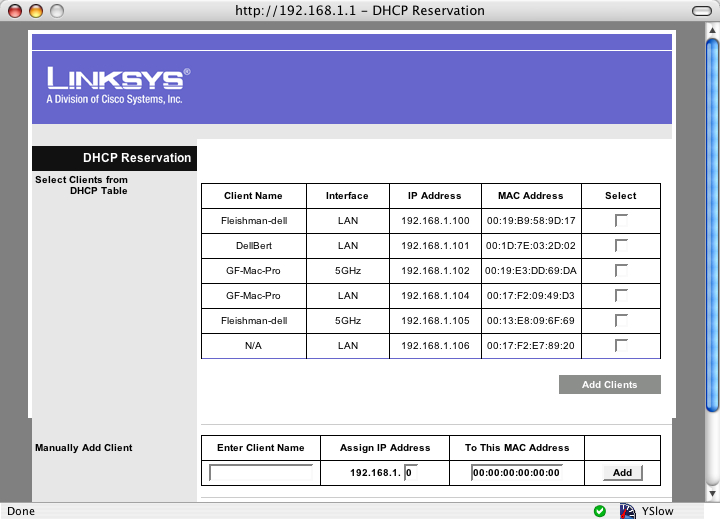 DHCP assistance. I like the DHCP Reservation system, which may not be unique to this model, but it's new to me. DHCP reservation lets you pick an IP address that remains persistent for a given device based on its MAC address, or the name that's set for the machine, and broadcast as part of the DHCP request. (On Macs, there's an option called DHCP ID, which is set separately, and can't be used for Windows machines.)
If you're trying to find the list of attached clients over DHCP, you use the DHCP Reservation button in the main Setup screen. It shows the client, and how it's connected: via the wired LAN or a wireless connection, where it shows which band it's connected via.
Picking SSIDs. Linksys made a strange decision in having their EasyLink Advisor set the same network name or SSID for both the 2.4 and 5 GHz networks. For adapters that support both bands, there's no simple way to mark which network you'd prefer to join. I found in testing that Linksys's own WPC600N dual-band PC Card joined the 2.4 GHz network, and I didn't see a way to change that behavior. I don't know of any tools in Windows or Mac OS X that let you preferentially set the band for networks that roam across bands, not just routers.
The advisor also won't let you choose an SSID which contains spaces, which is baffling. Linksys told me that this is due to legacy support issues as the advisor can handle older routers that cannot accept spaces in SSIDs. Sad that the advisor isn't smart enough to know which routers can and cannot, since spaces improve the legibility of a network name.
Again, I went into the advanced setup and entered separate names for my two networks. That worked perfectly.
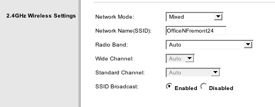 Wide channels by default in 2.4 GHz. Linksys has chosen to release a router that's configured in opposition to the Wi-Fi Alliance certification standards; it's a loophole. Linksys ships the WRT600N set to use 40 MHz channels in 2.4 GHz by default, which means that when you turn the device on, you will interfere with double the number of networks that you would otherwise. The Wi-Fi Alliance Draft N standards say that the default should be 20 MHz, with manufacturers able to decide whether users can optionally enable wide channels. However, the alliance doesn't test for this (or even have a checkbox, apparently); Tim Higgins wrote about this last week. Update: Higgins writes on 31 Oct 2007 in his review of the WRT600N that he cannot observe the gateway dropping into 20 MHz channels as it should.
If the WRT600N would follow the standard procedure of not transmitting using a 40 MHz channel when there's traffic present that it would step on, among other characteristics, that would mitigate this problem. It would essentially moot the issue, as despite being set to 40 MHz, the router would never use a wide channel if the wrong conditions were in place.
There are three mechanisms in the Draft 2.0 version of 802.11n that are supposed to prevent Draft N devices in 2.4 GHz from sending data over wide channels in those routers that will support 2.4 GHz wide channels. I can't determine whether Linksys has implemented these mechanisms. It remains to be seen whether Linksys is acting as a good neighbor or an indifferent one.
In the best outlook if the WRT600N doesn't back off to 20 MHz before transmitting, adding a WRT600N is like adding two 2.4 GHz Wi-Fi networks, which happens all the time. In the worst outlook, the default Linksys choice degrades the shared commons far more than it needs to, thus making everyone's experience in your airspace somewhat worse.
Inadequate 5 GHz channel selection, but commensurate with everyone else. Linksys, like other manufacturers, supports just eight of the 23 possible 20 MHz channels in 5 GHz: the four lowest and the four highest, known as UNII-1 and UNII-3. The middle 15, UNII-2 and UNII-2 extended, aren't available. Apple made the same call.
A Linksys spokesperson explained that because the middle 15 channels require additional FCC certification, a backlog in that testing has prevented the inclusion of these channels. Devices that use UNII-2 and UNII-2 extended frequencies must detect and avoid radar that's in use on some of those bands around the U.S. as part of the compromise that opened more spectrum up in 5 GHz. Apple hinted to me in August that something was afoot, too. Some changes went into effect in July for legacy channels (UNII-2) that seems to have slowed certification down.
The Linksys router selects the optimum 5 GHz channel out of the four 40 MHz or eight 20 MHz it supports by default. But if you change the router's configuration from Auto to choose a specific channel, you are limited to just the lowest four (UNII-1). This is a bit baffling.
Conclusion. A number of choices have led to this router being harder to set up for a user that might demand two bands than it should have been. The lack of WPS makes it more difficult to secure for average users. And Linksys's specific choice to release a loopholed router under Draft N certification rules is simply baffling.
With firmware upgrades, I expect this router will shine. But I'll have to wait to see such upgrades before I could warmly recommend it.
Posted by Glenn Fleishman at 4:13 PM | Permanent Link | Categories: Hardware | 2 Comments
Pepwave Mobility can keep an active Wi-Fi connection at up to 75 mph, the company says: The device is the first mobile router I'm aware of that's designed as a separate product, rather than as part of an integrated package that includes propriety elements and often installation and maintenance. They have no per se competitor that I'm aware of for this segment. The company plans to sell the unit to service providers and others starting at $495 for a 100 mW radio (European market), with higher prices for 200 mW and 400 mW radios (U.S.).
Enabling mobile communications in commuter vehicles was supposed to be one of the ancillary benefits of city-wide wireless networks, but it's been mostly ignored. Most commuter-based Internet access over Wi-Fi uses satellite or cellular backhaul.
Posted by Glenn Fleishman at 12:40 PM | Permanent Link | Categories: Commuting, Hardware, Metro-Scale Networks, Transportation and Lodging
To understand what's wreaking havoc on your wireless networks, a spectrum analyzer is key: Sure, you can make guesses. Talk to neighbors. Use Wi-Fi and Bluetooth scanners. But those approaches have limits. What you really need is a spectrum analyzer that can scan the surrounding area across a frequency range and show numerically and graphically what's in the air around you. By moving around with a mobile analyzer, you can pinpoint actual problems, and see displayed over time a moving target as to what's destroying your network's utility.
MetaGeek has two affordable options for desktop Mac OS X, Windows, and Linux analysis, both of which come in the form of a USB stick. When I say affordable, I mean that their units retail for $199 and $399 versus $2,000 and up for full-featured IT management packages and hardware or standalone devices. The two options scan the 2.4 GHz band used for 802.11b/g and one of the bands 802.11n supports. Bluetooth, ZigBee, and cordless phones--among many other devices--also use the band.
The original Wi-Spy debuted over a year ago; the Wi-Spy 2.4x is a more recent entry from June of this year. The differences between the two units were originally software support, with Mac OS X software available just for the original WiSpy at the launch of the newer device. The Wi-Spy 2.4x now has two Mac OS X supporting applications, too, due in part to the programming interface provided by MetaGeek.
MetaGeek has a nice comparison table that explains the difference between the original and 2.4x versions of their product. It boils down to the 2.4x offering greater resolution--it can capture signal strength on a smaller set of frequencies at once--along with higher sensitivity, and an antenna. The antenna can be removed and replaced with others using the same jack style (RP-SMA).
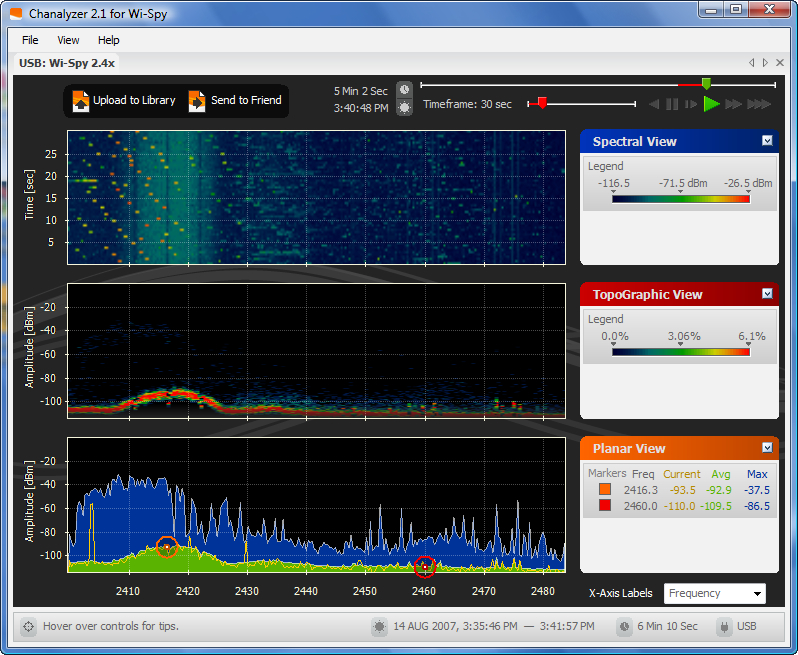 I tested both units in my office under Windows Vista and Mac OS X. My office in Seattle's Fremont neighborhood, a mixed retail/office/residential area, has a plethora of Wi-Fi networks. I can see from eight to 14 networks in my office, which is nestled inside a building. I tried turning on a microwave oven adjacent to my office to see what effects that created, too.
Using MetaGeek's own Chanalyzer software, I could watch Bluetooth dancing all over the 2.4 GHz band. Chanalyzer lets you set mark points to track in planar view, in which activity is marked for average and maximum uses across the band, while a live line shows current signal strength. The topgraphic view shows a concentration of activity over time. The spectral view is a moving track that you can replay and change the time dimension on to expand or contract a moment you're viewing. The program lets you "record" a scan, which you can replay in the software. MetaGeek also created a community for sharing scans among those interested in that sort of thing, and has samples you can download and replay in Chanalyzer to show various tests they've performed. (Chanalyzer 2.1 works under Windows. WiSPY-Tools is an independent Linux, BSD, and Mac OS X package with similar features. MetaGeek has a beta of Chanalyzer for Mac that's not currently linked on their Web site.)
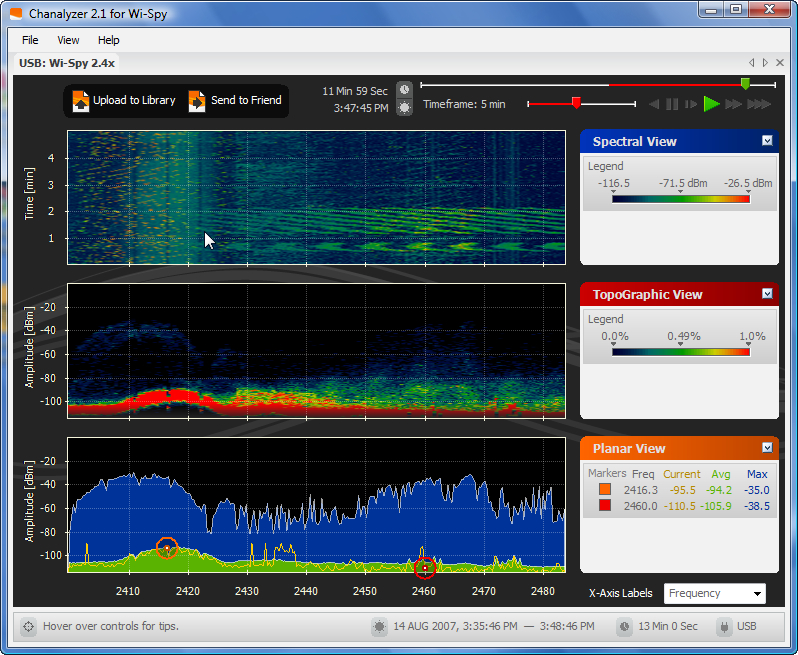 The scan above shows the normal environment--fairly congested, and you can see the Bluetooth spikes (by clicking to view the full-size image) as lines that leap up in yellow in the planar view. When I turned on the microwave oven, there was some impact (see at left). In the spectral view, you can see the diagonal green lines between 1 and 2 minutes on the time scale when the microwave was first active; I turned it on again briefly and you can see another set of angry lines. In the topographic view, notice the haze of interference rising above the deeper, thicker red band.
I also experimented with EaKiu, a free and independent Mac OS X software package that supports both the original Wi-Spy, and was updated recently to version 4.0 with Wi-Spy 2.4x support. The package offers some interesting 3D options for visualization, in which you can rotate a continually updating series of receding planes.
I honestly found it tricky to figure out how to test the Wi-Spy models since I had no particular issues facing my rather ugly RF environment at the office, but one fortunately dropped into my lap. Apple recently released its revised model of AirPort Extreme Base Station with Draft N by adding gigabit Ethernet. They also tuned some internal firmware issues to improve speed when network address translation (NAT) was in use. For a review in Macworld magazine, I re-ran the same performance tests that I put the Extreme through in February. In the 5 GHz band, everything was copacetic: terrifically improved speeds due to the gigabit Ethernet removing internal limitations that restricted performance.
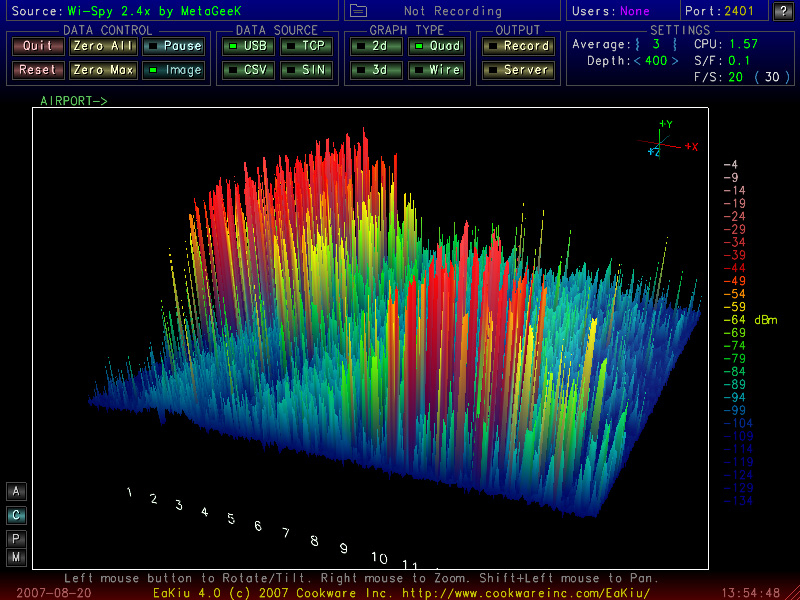 But in 2.4 GHz, I was stymied. I could hardly get my N adapters (Intel and Apple) to connect to the base station. With Apple's advice, I turned off Automatic channel selection and chose channel 1. I was seeing kilobits per second throughput when I could connect where I should have seen 30 to 70 Mbps. I fired up the Wi-Spy 2.4x to see what was the matter.
It seemed like I was seeing a lot of energy down at the lower end of the band even when the Extreme wasn't transmitting. I switched to channel 11, and, magically, performance was restored. Now, according to iStumbler, no one is transmitting in channel 1, so there's other ugliness involved. If you look at the Eakiu screen capture (at right), you can see the time sequence moving from newest to oldest on the Z axis (roughly front to back). I switched from channel 1 to 11 right where you see energy levels go down and red (higher dBm signals) disappear on the left, and start to fire up into red on the right. Clearly, something's using that part of the 2.4 GHz band (amateur radio? electronic newsgathering? another licensed purpose? an ugly transmitter?). But without the Wi-Spy, I would have been slightly flummoxed.
The Wi-Spy isn't for every network manager or hobbyist, but it's going to help IT professionals and Wi-Fi busybodies like myself answer a lot of questions that are otherwise lost in the ether.
Posted by Glenn Fleishman at 3:04 PM | Permanent Link | Categories: Gadgets, Hardware, Spectrum
Apple slips in 1000 Mbps Ethernet in its Wi-Fi router: Apple quietly upgraded its Draft N-based AirPort Extreme Base Station to full gigabit Ethernet support across its three LAN and one WAN ports today. While the company didn't release information separately, they contacted me to note the change, and the Apple Store's product listing has been updated. The new base station can be ordered right now.
The first release of Apple's Draft N base station was rather marvelous for its inclusion of a USB port to share multiple printers and hard drives; the company's decision to have both 2.4 GHz and 5 GHz radios inside; and the fact that Macs had been shipping with 802.11n inside, requiring just an enabler, released with the base station, to upgrade their performance. My primary complaint, however, was the mismatch between the company's widespread inclusion of GigE in most of its models long before the competition. With the drop in cost in GigE switches, it seemed odd for Apple to release a unit that was designed for homes and small offices that would underperform a $35 Ethernet switch.
I also suspected that the overall performance of the 802.11n draft that Apple is using was constricted due to internal Ethernet limits. In my testing for a review in Macworld, I was able to top 90 Mbps in Wi-Fi to Ethernet and Wi-Fi to Wi-Fi transfers. But Ethernet-to-Ethernet data was limited to just over 90 Mbps as well. Apple says that their new gigabit Ethernet base station is up to 50 percent faster for wireless-to-wired links, which would put it closer to 150 Mbps, a speed achieved on other GigE-based Draft N routers.
When testing the base station in February, I discovered that with NAT enabled to share access from an incoming WAN link, performance was restricted to about 30 Mbps from wireles LAN to LAN and 60 Mbps from wired LAN to WAN. Apple confirmed this was a bug that was due to performance issues in their NAT stack. Apple wasn't able to tell me if this limitation has been fixed, but I would imagine so.
This bug emerges in only two edge cases: Where a broadband connection exceeds 30 Mbps, which is true for some fiber and cable customers; or where a corporate or office LAN isn't supplying addresses to the computers connected via the AirPort Extreme. If NAT is turned off, the AirPort gateway has no performance limitations.
The price for the AirPort Extreme Base Station with Draft N remains $179.
Posted by Glenn Fleishman at 2:25 PM | Permanent Link | Categories: Hardware, Home, SOHO
Cisco releases full details on problem at Duke: While widely reported that one or two Apple iPhones out of about 150 used on Duke University's Wi-Fi network were bringing down groups of a dozen to 30 access points at one time, it turns out it was a Cisco fault all along that the iPhone triggered. A Duke assistant IT director initially blamed the iPhone for the problem. He later posted a note on his blog that he "regret[ted]" sounding quite so sure it was the iPhones' fault.
Cisco's security advisory, "Wireless ARP [Address Resolution Protocol] Storm Vulnerabilities," explains how in a very particular set of circumstances, a mobile device moving between access points and retaining certain information could cause Cisco network controllers to produce a storm of ARP requests. When I first heard about this problem in email from Miller--I declined to write about this because I thought it was too speculative at the time--the 18,000 ARP requests being made per second seemed like far too high a number to be produced over a wireless connection by a single mobile device.
While the advisory doesn't cite the Duke situation, the company confirmed that the Duke situation was what triggered this advisory and update, according to Network World.
The iPhone is now in the clear as the culprit, just the trigger. It's likely we'll see more vulnerabilities and bugs show up, however, because of the extreme mobility and promiscuity of the iPhone. It's willing to connect to any network it knows whenever it sees it, and to hop off onto EDGE whenever the network performance drops too low.
Posted by Glenn Fleishman at 10:34 AM | Permanent Link | Categories: Enterprise, Gadgets, Hardware